Skip to content
View in the app

A better way to browse. Learn more.

FengShui.Geomancy.Net

A full-screen app on your home screen with push notifications, badges and more.

To install this app on iOS and iPadOS
  1. Tap the Share icon in Safari
  2. Scroll the menu and tap Add to Home Screen.
  3. Tap Add in the top-right corner.
To install this app on Android
  1. Tap the 3-dot menu (⋮) in the top-right corner of the browser.
  2. Tap Add to Home screen or Install app.
  3. Confirm by tapping Install.
About Feng Shui at Geomancy.Net
Sponsored Link
 

Selection of Auspicious Dates for First-Time Open Door/Move-In/Start of Renovation

98.00 USD

Auspicious Date service to help you find the most auspicious for First-Time Open Door/Move-In Dates

URL: Learn more about our Auspicious Dates for Key Life Events: Open Door, Renovation, Move In

Key Features

  • Comprehensive Ba Zi compatibility analysis to identify the most auspicious date and time for your first-time Open Door, start of renovation, move-in, or other important events.

  • Includes the most auspicious hour for each recommended day.

  • Procedures for first-time Open Door, start of renovation, or move-in are provided for clients selecting dates for these events.
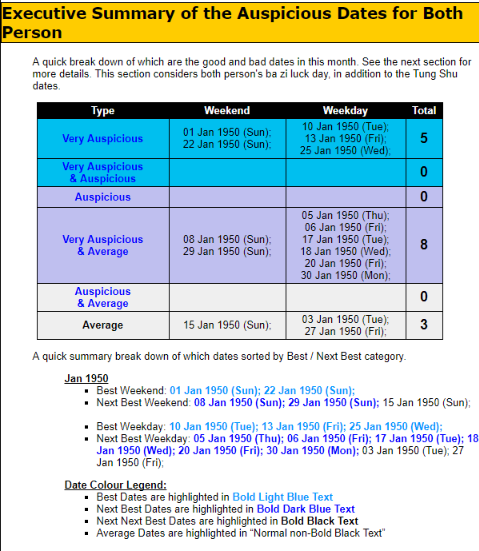
wedding_date_summary_executive_summary.png.3cc537e000801f49dbd1620a4bba1bed.png


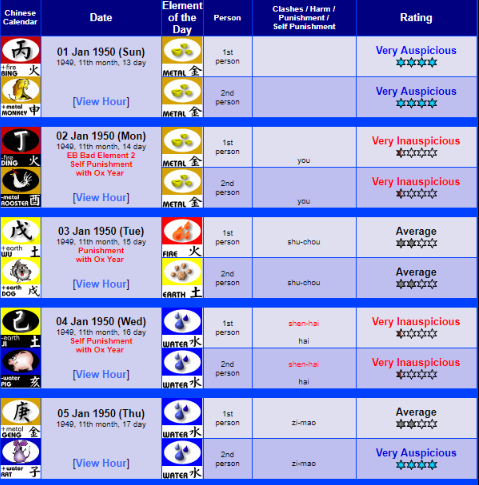
wedding_date_summary_details.png.7c5002d0c022279f532371575a586eb1.png

1896848090_HEALTHWEALTHANDHAPPINESS50.png.f952b2f62d103a15ac9504d78e890d64.png

WHATSAPPx.gif.933b1f171b62310142ae17b5501fc685.gif 

Robert Lee, +65 9835-5734 / support@geomancy.net


Learn more about our Auspicious Dates for Key Life Events: Open Door, Renovation, Move In

URL: https://www.geomancy.net/content/en/services/dates/auspicious-dates-for-key-life-events-open-door-renovation-move-in

Sponsored Link
 

Account

Navigation

Search

Search

Configure browser push notifications

Chrome (Android)
  1. Tap the lock icon next to the address bar.
  2. Tap Permissions → Notifications.
  3. Adjust your preference.
Chrome (Desktop)
  1. Click the padlock icon in the address bar.
  2. Select Site settings.
  3. Find Notifications and adjust your preference.