



Cecil Lee
Staff
-
Joined
-
Last visited
Everything posted by Cecil Lee
-
Attached please find some other interesting assorted methods:- a. Fortune testing b. Horoscope for girls c. Horoscope and work.... These are non-Chinese methods... please read them with an open mind...
-
What your birthdate tells you.... Your personality has link to your Date of Birth. To find out more,pls read on. This method is not a Chinese `method', I am not sure the origin of the source... Please keep an open mind when reading this... Date of Birth: *1st Day of the Month A birthday on the first day of the month means that you have a strong will, are self-reliant and independent. people may say you "think too much," because you like to plan but not to actually build. Similarly,you're better at diagnosing what's wrong than prescribing a remedy.You have a good mind and like to reason things out. Practical and idealistic at the same time, you refer most things to your head rather than to your heart. As a result, although you are capable of great affection, you are not usually demonstrative of it. In spite of all your independence you are very sensitive and need positive feedback and encouragement. You possess a great deal of unexpressed power. *2nd Day of the Month A birthday on the second day of the month indicates that you are highly emotional and very sensitive to your environment.Somewhat nervous and forgetful, you make friends easily and they have great fondness for you.You're warm hearted and need demonstrated affection, so you like people to make a fuss over you. It's important that you avoid mood swings and anything that depresses you. While you like material comfort, you aren't always willing to make the effort to get it. Your talent for rhythm can be expressed in writing poetry or music. *3rd Day of the Month A birthday on the third day of the month indicates that you have great vitality and can quickly recover from illness. Your vivid imagination enables you to make a good story out of the smallest event. You have innate critical and literary abilities, and need a variety of interests to keep you busy. Intense and extreme in your affections, you have great emotional crises from which you recover quickly. You're a social animal, expressive in public and at your top form in front of an audience. Although you are restless, you are also easily satisfied and able to make the best of conditions. *4th Day of the Month A birthday on the fourth day of the month indicates a four-square individual, a lover of nature, home, family and country.You are most likely to be successful in manufacturing, building, utilities, textiles -any occupation connected with the products of the earth. Music, painting or sculpting offer relaxing sidelines,although you could commercialise any of these as well. You're rather set in your ideas and tend to impose them on others, seeing yourself as the final arbiter of good manners and correct ethics. Your belief in discipline makes it hard for you to express your feelings, and as a result you suffer a great deal emotionally. When it comes to work,you drive yourself tirelessly-and, unfortunately, everyone else,too. You have a decided tendency to overwork and if need be should schedule time for recreation. *5th Day of the Month A birthday on the fifth day of the month indicates that you are adaptable, enthusiastic and somewhat boastful.You have a fine mind and active imagination, and love to serve up your stories with all the trimmings. A lover of life, hale fellow well met, you're excellent company and keep things moving rapidly. Yours is a life filled with all sorts of new experiences and constant change.Although you are the type who refuses to be tied down by anything, you are the "marrying kind." You have a good singing and speaking voice. *6th Day of the Month A birthday on the sixth day of the month indicates a love nature. You bloom with praise and appreciation, but wilt in the face of criticism. When involved in a relationship you lavish your affection on your beloved - at least for as long as the relationship lasts. The 6 seeks perfection and seldom finds it, so it looks elsewhere. Following such a course will earn you a reputation for being untrustworthy. You love children but don't have to have your own to be happy. Even though you are well protected, you worry constantly about not having enough money. Mental rather than intellectual, you have natural acting abilities that can help you succeed on the stage or in business. You have literary and artistic tendencies, and can attract the money or backing you need. The one area in which you are not talented is mechanics. Having people around you in a harmonious atmosphere is essential to your well being. *7th Day of the Month A birthday on the seventh day of the month indicates a specialist, on with a keen mind capable of deep mental analysis. You shouldn't gamble or speculate; on the contrary, you must closely examine every detail of any enterprise before becoming involved in it. Strongly intuitive if not psychic, you should never take advice that goes against your "gut feelings." You must WAIT for what you want rather than aggressively seek it, for what you long for comes to you only if it is not actively sought. You have talent for stringed instruments ( including the piano ) and the organ,as well as excellent judgement in money matters. Your opinions are firm and you don't like to change them; moreover,physical adjustments not easy for you and you tend to be a loner,all of which makes marriage difficult. Spend a portion of each day alone to relax andmeditate. *8th Day of the Month A birthday on the eighth day of the month indicates a creative,productive individual with natural business acumen. Progressive and expansive, you deal well in matters of general or public interests, but should avoid equal partnerships because you need to be in a position to make the final decisions. Large businesses, corporations and governmental your bailiwick, in any of which you must express honesty and integrity in order to be permanently successful. More fond of books than you are of reading,you're inclined toward large gestures; if you have it,you give great sums of money to institutions or charities. You are somewhat ostentatious and want your family to be a credit to you. *9th Day of the Month A birthday on the ninth day of the month indicates publicity,distribution, art, broadmindedness and philanthropy (defined in The Wizard of Oz as "good deed doing" ). You're interested in metaphysics and relate them to what's going on in the world. Literary, artistic and strong willed, you're a natural ruler who can succeed in almost anything artistic, as well as writing,teaching, law, publishing or the ministry. You need a broad education so that you can better choose your profession. You belong both in and to the world, making it difficult for you to lead a purely personal life successfully. Marriage during the middle portion of your life is likely to end, through death,divorce or some other separation, though the love may remain intact. Yours is a life filled with long journeys and many changes. *10th Day of the Month A birthday on the tenth day of the month indicates a person with many interests, capable of doing several things at the same time.Many others depend on you but few offer help, so you may feel rather isolated and alone. You have a good mind and strong will, and are an adept promoter of things you believe in. When it comes to friends & possessions ( which you may regard in the same light ) you are quite jealous and exclusive - you do not share either. Your creative talent is best expressed in the business world, but art, particularly music or painting, is a fulfilling sideline.Hospitable but not domestic, you don't like to be burdened with the details of maintaining a home. Your vitality enables you to quickly recover from physical and emotional ills. *11th Day of the Month A birthday on the eleventh day of the month indicates an inspired, imaginative individual with determination and perseverance, but with fluctuating levels of energy.In keeping with this master libration, you are very dramatic in both thought and action, brilliant, scintillating,but nervous and high strung. You react quickly - shoot from the hip and need to be careful that your intellect doesn't bury your intuition.There's a tendency for you to impose your own moral code on others and not allow for human frailty. Your passions are intense, extreme and without reason; in fact, you are a person of extremes all around,in the clouds one minute, in the pits the next. In reacting to these extremes, take care not to overcorrect. Guard your health and nerves,and avoid any tendency to be mercenary, acquisitive or self-aggrandising. *12th Day of the Month A birthday on the twelfth day of the month indicates a brilliant,magnetic, imaginative person, a good speaker who can be very convincing in an argument. Since you have a well balanced mind, artistic, tendencies and enjoy life and action, you could succeed as a trial lawyer, actor or in sales /advertising.Your high ideals demand that u have a "mission" in life.You need to keep intellectually active to avoid the ups and downs that are the handicap of all 3's. Your flair for design would serve you well in architecture or interior decorating. Flirtatious and inclined toward affairs, you need to finish what you start and avoid the tendency to scatter. *13th Day of the Month A birthday on the thirteenth day of the month indicates a riddle inside a contradiction, creativity, expansion and restlessness (1+3 ) behind regularity and limitation (4 ).You are sensitive and spiritual, suffer through your environment,and are given to explosions of temper. Your good mind is offset by an exceptionally stubborn will, and while you have a strong nature, you seldom show it and then suffer because of it.Often misunderstood, you are considered temperamental and at times unreasonable, and while you are inclined to be dictatorial,you are an excellent manager.Your best success is in dealing with the earth mining,geology,practical construction. A walking dichotomy, you love a uniform but hate war.Home is essential to your happiness. *14th Day of the Month A birthday on the fourteenth day of the month indicates a versatile and dual person with both a reasoning and a prophetic mind. "Lucky" in games of chance and contests, you're a natural bettor and gambler.Your success lies in business on a large scale, but you need some form of artistic expression for recreation and to "let off steam." Very emotional, you can always be appealed to through your feelings and sympathies. You are apt to crave constant change,and should avoid all of the pitfalls associated with the physical -drugs,alcohol,promiscuity and other sexual excess. You can be a bridge between the physical and spiritual worlds, and have great constructive or destructive power - as you choose. *15th Day of the Month A birthday on the fifteenth day of the month indicates a gifted person under the protection of the kindly, harmonious six who absorbs knowledge rather than acquires it through hard study.In fact you attract many things - friends, gifts, money,opportunities,& give the impression of youthfulness and good health. You're capable of much self-sacrifice for a good cause or to help a friend,but you will not submit to domination. Your mind is scientific but your expression is often musical; although your success lies in a professional career, music plays a pivotal role throughout your life. You love your home,and while you are demonstrative and generous, you are more inclined toward individual acts of charity than to institutional philanthropy. *16th Day of the Month A birthday on the sixteenth day of the month indicates a nervous and sometimes irritable person who makes complications and intricacies and then suffers the consequences.Naturally aloof, you nonetheless lean toward home and affection.Though you can succeed in art or literature, your powers of reason and analysis demand a business outlet as well.While not actively aggressive, you don't like your plans interfered with. You tend to put off until whenever the things you know you should be doing right now, and live too much within yourself. As much as you want affection, you don't always make the effort to learn it. *17th Day of the Month A birthday on the seventeenth day of the month indicates a high minded proud spirited individual, sometimes liberal,sometimes conservative,generous or stingy, collecting or dissipating.Very set in your ideas,you seldom yield to others; in business you do best at the head of the nterprise, working with under-partners. You execute whatever you do,have a particular talent for managing the interests and affairs of others, and are drawn to dealing in large affairs. The details are for someone else to take care of,since you hate to be bothered with them. You can be successful in any enterprise connected with the earth (e.g. land,mining,oil,livestock), as well as writing, though you are more inclined to technical or historical writing than to fiction. You love knowledge and like to explore. When it comes to spiritual matters, you want proof. *18th Day of the Month A birthday on the eighteenth day of the month indicates a person whose life is filled with change, activity and travel.You may find yourself responsible for the care of groups or communities that will tap your fund of helpfulness. Much is expected of you because much has been given to u: The independence of the 1 and the efficiency of the 8,manifesting to mankind through the 9.Since you don't like to take advice, it's as well that you rarely need it. You're drawn to any large field in need of efficient administration (e.g. law, politics, religion), and although your first efforts may not always succeed, you do succeed on repetition so try, try again.Somewhat emotional, you are nonetheless intellectual and enjoy both reasoning & arguing. These traits equip you well as a drama critic, writer or speaker. In money matters you are never rash, for you feel the responsibility of handling material assets. Marriages or engagements made during the middle portion of your life are likely to be broken. *19th Day of the Month A birthday on the nineteenth day of the month indicates the full gamut of the vibrations, from 1 through 9,influencing your personality. Logical, persevering, tenacious,practical,artistic and universal, you can rise to great heights or fall to great depths in both acts and emotions.You're independent and must not submit to limitations. This independence is the source of your dislike of society's conventions, which you refuse to follow in your private life,though you don't give public offence. Your versatility opens a wide range of career options for you, though you are suited to a profession rather than to business. Your deep sense of responsibility and strong impulse to better conditions equip you well for politics if you are so inclined. You crave change and variety, are always altering your surroundings and will need to make many adjustments in your personal life. *20th Day of the Month A birthday on the twentieth day of the month indicates a person best suited to small business, in a friendly, protective atmosphere. You prefer to work with others rather than shoulder all the responsibility yourself, and are somewhat disinclined to branch out into larger fields. Although you are a better speaker on paper than before crowds, your instinctive compassion and sensitivity suits you well to politics or ministry.Sympathetic and affectionate, you're able to accumulate a store of knowledge and should have a good education. Your attention to detail makes you well suited to professions demanding trait, such as corporate law or estate management. You prefer the country to the city & are deeply vested in your home,family and friends. While you like to be helpful, you're not inclined toward avoidable manual labour. Musical expression uplifts u,though you should pursue this as part of a group rather than a soloist. *21st Day of the Month A birthday on the twenty-first day of the month indicates an individual blessed with a beautiful singing and speaking voice that is a significant asset. Magnetic and musical,fond of beauty,art and dancing, you are rather nervous and high strung.You need to get a grip on the inexplicable aversions you feel toward certain things & people. When it comes to love you're more receptive than active in expressing it, but you take great pride in the objects of your affections. Your active imagination leads you to be suspicious, which can cause serious problems in relationships, especially marriage.Avoid the tendency to brood or become depressed.Inherently drawn to books, publishing, editing and related fields, you can be very successful anything educational. *22nd Day of the Month A birthday on the twenty-second day of the month indicates a high powered individual who functions in both the objective and subjective worlds. This is a master vibration and as such,nervous and over-stimulated; you need rest and seclusion in order to recharge and maintain your equilibrium. Highly intuitive, u should rely on your first impressions. Although you have unlimited power on both planes, you are constantly pulled between expressing your ideals and keeping them within constructive limits. The 22 bears the mission of universal utilitarianism, which leaves little room for personal ambitions.Your greatest success lies in the world of form, in any line that meets your ideals and contributes to the general good.Avoid any dubious or illegal transactions; you would be sure to be caught and suffer the consequences. *23rd Day of the Month A birthday on the twenty-third day of the month indicates a sympathetic, sensitive, understanding person with a practical turn of mind. You have an uncanny ability to diagnose physical ailments and would therefore be well suited for a career in medicine (but not surgery, since the mission of this vibration is to build and heal instead of tear down and destroy).Your technical ability and practicality may give you an interest in law, chemistry or stocks, but you are simply too practical to succeed in art. Self-sufficient, popular and sociable,you do not suffer from an inferiority complex. You get alot out of life because you make the best of any situation. You're a good friend who is willing to take on many responsibilities. *24th Day of the Month A birthday on the twenty-fourth day of the month indicates an extremely active person who must keep on the go in order to avoid wasting energy. Though you concentrate on one thing at a time, you thrive on constant change; you aren't the type to retire because you need to keeping expanding and enlarging.You're strongly allied to art and have considerable talent for the stage- your nature is thoroughly dramatic but are more likely to succeed in business or real estate. Externals don't count much with you, so you don't have much appreciation for the value of time or money. You're primarily practical, with a little inclination to dream and a large inclination to magnify your joys and sorrows. You have a decidedly domestic nature along with a well developed ego and will learn much through your powers of observation. Avoid depression, jealousy and worry. *25th Day of the Month A birthday on the twenty-fifth day of the month indicates a naturally prophetic and intuitive person with a strong leaning toward the occult. You tend to conceal your true feelings and as a result are not always understood. Artistically gifted,you can commercialise almost any area of art to which you are inclined. Success can also be enjoyed in the professions,business or the constructive side of politics. You tend to be vacillating and inconsistent, and until you overcome this tendency your affairs will suffer. It's imperative that you learn to concentrate, force your mind into stability and away from a sense of inferiority, self-pity and depression.Your affections are your greatest weakness, and you must always stay on the straight and narrow, for there's a strong tendency to wander from the path that inclines you to preach morals but practice excess. Idealistic and hopeful, you need to work against laziness. *26th Day of the Month A birthday on the twenty-sixth day of the month indicates an individual with full closets and drawers, for nothing is too small for practical use, and you just know that you'll need it if you get rid of it. You're very introspective and tend to live in the past -to the detriment of the present and future.Although you start many things, you find it hard to finish them,and either rise above or fall below average- as you choose.You can commercialise anything in the artistic lines except music in a big way. You can also do well in politics or diplomacy, and should have a good education. You have a beautiful domestic nature,love home and children and are the "marrying kind."Fastidious about your personal belongings and fond of colour and show in the clothes you wear, you nonetheless do not insist on physical comforts and are very generous to others. *27th Day of the Month A birthday on the twenty-seventh day of the month indicates a more materially inclined individual than those the other "9"birthdays (9th and 18th). The 27 is a strong marriage vibration, though the experience may be disappointing.You're forceful, quietly determined but somewhat erratic, a natural leader who cannot be satisfied in a subordinate position.Neither do u like to account for your own conduct. Versatile and artistic,you have literary talents and could be a journalist,writer,lecturer or teacher. You're ardent in your affections but tend to overdo family traits. Your religious tendencies are toward Eastern beliefs and away from orthodoxy. *28th Day of the Month A birthday on the twenty-eighth day of the month indicates a strong willed, dominant, tenacious person who is nonetheless filled with love and willing to go to any lengths for its sake. In this regard, your unions may be unconventional, but are always in keeping with your ideals.Executive by nature, you want to excel and will make great sacrifices to do so. Your tendency to daydream and goof off could nullify all your wonderful gifts, so you must never let laziness get the upper hand. Most of your disappointments come from magnifying everything that concerns your life.Freedom is essential to you; you suffer when restrained or limited in anyway. Watch out for the tendency to drop your ideals once you have realised them since this can deny you your final success. *29th Day of the Month A birthday on the twenty-ninth day of the month indicates inspiration, spirituality and leadership abilities,since this is a master vibration. You have a unique ability to bring together disparate forces and can mediate labour problems or unify religious differences. your powers are great;you can use hem to bring honour or destruction to yourself and others - as you choose. You're an extremist in everything intense in love and judgements, either way up or way down emotionally.Home is essential to your happiness, but you're high strung and moody, and not easy to live with. You get absorbed in your dreams, aspirations and plans and forget to consider the needs or feelings of those around you. You need a definite work to keep you balanced and efficient. *30th Day of the Month A birthday on the thirtieth day of the month indicates a vital,rather nervous individual who seldom suffers from illnesses thanks to an enviable ability to throw them off.You need to avoid any type of obsession and should never experiment with the occult "for fun." set in your opinions,you always think you're right, basing your conclusions on a little knowledge combined with much imagination and intuition.Fundamentally loyal, a true friend, you would make a good teacher, writer or social worker. You're flirtatious, but fundamentally loyal & like to be thanked for the thoughtful things you do. Although you're an excellent manager,you're not terribly fond of work. *31st Day of the Month A birthday on the 31st day of the month indicates a person who,like those born on the thirtieth, shouldn't play with psychic phenomena. Your aspirations aren't always reasonable,which leads to disappointments; you need to apply practicality and patient hard work to your endeavours in order to succeed.You don't like to live alone and responsibility is a stabiliser for you,so it makes sense that you're the "marrying kind " You have good business qualities but need to get a grip on your tendency to spend money and dissipate other assets foolishly.Interior decoration, writing, chemistry and pharmacy (you have a special talent for combining drugs and medicines) are other career avenues for which you are well suited. You never forget a kindness - or an injury, real or imagined.
-
Sally jumped up as soon as she saw the Surgeon come out of the operating room. She said:"How is my little boy? Is he going to be O.K.? When can I see him?" The Surgeon said, "I'm sorry, we did all we could." Sally said, "Why do little children get cancer, doesn't GOD care any more? GOD, where were you when my son needed you?" The Surgeon said, "One of the nurses will be out in a few minutes to let you spend time with your son's remains before it's transported to the university". Sally asked that the nurse stay with her while she said good-bye to her son. Sally ran her fingers through his thick red curly hair. The nurse said, "Would you like a lock of his hair?" Sally nodded yes. The nurse cut a lock of his hair and put it in a plastic bag and handed it to Sally. Sally said, "It was Jimmy's idea to give his body to the university for study. He said it might help somebody else," and that is what he wanted. I said, No at first, but Jimmy said, "Mom I won't be using it after I die, maybe it will help some other little boy to be able to spend one more day with his mother". Sally said, "My Jimmy had a heart of Gold, always thinking of someone else and always wanting to help others if he could". Sally walked out of the Children's Hospital for the last time now after spending most of the last 6 months there. She sat the bag with Jimmy's things in it on the seat beside of her in the car. The drive home was hard and it was even harder to go into an empty house. She took the bag to Jimmy's room and started placing the model cars and things back in his room exactly where he always kept them. She laid down across his bed and cried herself to sleep holding his pillow. Sally woke up about midnight and laying beside of her on the bed, was a letter folded up. She opened the letter, it said: Dear Mom, I know you're going to miss me, but don't think that I will ever forget you or stop loving you because I'm not around to say I LOVE YOU. I'll think of you everyday mom and I'll love you even more each day. Some day we will see each other again. If you want to adopt a little boy so you won't be so lonely, he can have my room and my old stuff to play with. If you decide to get a girl instead, she probably wouldn't like the same things as us boys do, so you will have to buy her dolls and stuff girls like. Don't be sad when you think about me, this is really a great place. Grandma and Grandpa met me as soon as I got here and showed me around some, but it will take a long time to see everything here. The angels are so friendly, and I love to watch them fly. Jesus doesn't look like any of the pictures I saw of Him, but I knew it was Him as soon as I saw Him. Jesus took me to see GOD! And guess what mom? I got to sit on GOD'S knee and talk to Him like I was somebody important. I told GOD that I wanted to write you a letter and tell you good-bye and everything,but I knew that wasn't allowed. God handed me some paper and His own personal pen to write you this letter with. I think Gabriel is the name of the angel that is going to drop this letter off to you. God said for me to give you the answer to one of the questions you asked Him about. Where was He when I needed him? God said, "The same place He was when Jesus was on the cross. He was right there, as He always is with all His children. Oh,by the way Mom, nobody else can see what is written on this paper but you. To everyone else, it looks like a blank piece of paper. I have to give God His pen back now, He has some more names to write in the Book Of Life. Tonight I get to sit at the table with Jesus for supper. I'm sure the food will be great. I almost forgot to let you know - Now I don't hurt anymore, the cancer is all gone. I'm glad because I couldn't stand that pain anymore and God couldn't stand to see me suffer the pain either, so He sent The Angel of Mercy to get me. The Angel said I was Special Delivery! Signed with love from:God & Jesus & Me
-
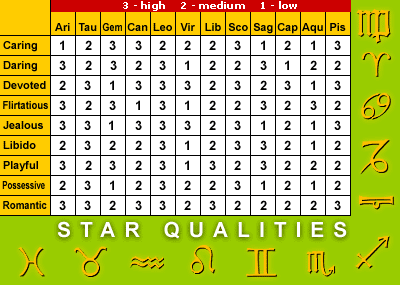
JANUARY 1st - FEBRUARY 2nd AMMON (GOD OF PROPHETS) Those born under this sign have a sure talent for recognising Mr/Ms Right the first time they see him/her - for them it's often a matter of love at first sight. When this happens, usually at a chance meeting in public places like shopping malls or restaurants, you can attract him/her by radiating happiness. You'll find it will captivate him/her. FEBRUARY 3rd - MARCH 4th SUCHOS (GOD OF THE SACRED NILE) Better known as the Crocodile God, Suchos guarded the treasures of ancient Egypt. Those born under this sign are attracted by beauty, and ancient wise men warned them not to be blinded by it. "Look beyond an attractive appearance and find the real man beneath," they warned. "Listen to your heart, instead of what your eyes tell you." MARCH 5th - APRIL 9th OSIRIS (GOD OF FERTILITY) If you were born under this sign, don't expect to fall in love at first sight. Those ruled by Osiris need time for love to put down roots in their hearts, but it will grow stronger until it blossoms into romance that will last a lifetime. APRIL 10th - MAY 2nd PTAH (GOD OF TRUTH) Ptah's people are very sincere and have to be careful to avoid being hurt in romance. You'll find your Mr/Ms Right practically on your doorstep because you've known him/her for a long time. Because he's a down-to earth type who appreciates sincerity, he'll be attracted to you sooner or later, so don't be pushy when you recognise him. MAY 3rd - JUNE 16th HORUS (GOD OF LIFE) The hawk-headed god rules a fickle sign - those born under it have roving eyes and a passionate nature. Life for them is finding a series of Mr/Ms Rights, and they have no trouble doing it. For true Romantic happiness, you need a very strong, steady type of man/woman who can tame your restless spirit and still give you the excitement you crave. JUNE 17th - JULY 21st NEPHTAPHIS (GODDESS OF TRUE LOVE) Beautiful Nephtaphis watches over this most dreamily romantic of all signs. Her children are incredibly loyal to their lovers, and are actually capable of becoming one with them in body, mind and soul. For this reason they have to be careful to choose men/women as caring and considerate as themselves, or they will cruelly be taken advantage of. JULY 22nd - AUGUST 18 SETI (GOD OF THUNDER & LIGHTNING) Like their turbulent guardian, those born under this sign have quicksilver temperaments and have to keep their thermostats lowered if they want their love lives to heat up. You need an even-tempered, understanding type who can put up with your occasional outbursts. AUGUST 19th - SEPTEMBER 21st ANUBIS (THE PROTECTOR GOD) If you were lucky enough to be born under this sign, you can look forward to life-long romance that will never stop growing. Mr/Ms Right for you is the mystery man type who has a multi-faceted personality and will forever be revealing new and fascinating aspects of himself/herself, thereby continually giving you something new about himself for you to love. SEPTEMBER 22nd - OCTOBER 15th RA (THE SUN GOD) You'll have no trouble finding Mr/Ms Right because you're what every man/woman is looking for - tender, understanding, passionate, and intensely loyal. Men/Women will flock to you, so you can afford to be choosy. Pick the man/woman who is most deserving of the prize you are, and don't look back. Your only fault is a tendency to wonder if you made the right choices in the past, so keep your eyes peeled on the future. OCTOBER 16th - NOVEMBER 9th ISIS (GODDESS OF MIRACLES) Those born under the sign of this ancient Egypt's chief goddess have a magic touch. With a smile, they can captivate any man/woman who attracts them. Finding Mr/Ms Right is easy for Isis' sons/daughters they can spot him/her a mile off and snare him/her with their great charm. NOVEMBER 10th - DECEMBER 3rd THOTH (GOD OF LIGHT) Thoth's children have a hard time displaying their feelings, especially the romantic ones. When you meet Mr/Ms Right, show him how you feel, don't keep him/her guessing or waiting. DECEMBER 4th - DECEMBER 31st HATHOR (GODDESS OF MUSIC & THE ARTS) Hathor's children are in love with love. They tend to fall head over heels in love with the first man that shows any interest in them, and they stick to them like glue. Keep a level head and be sure he's really Mr/Ms Right. Your type of man/woman likes harmony, and you have to show him/her that you're the onewho can provide it.
-
A nice article on WHY?
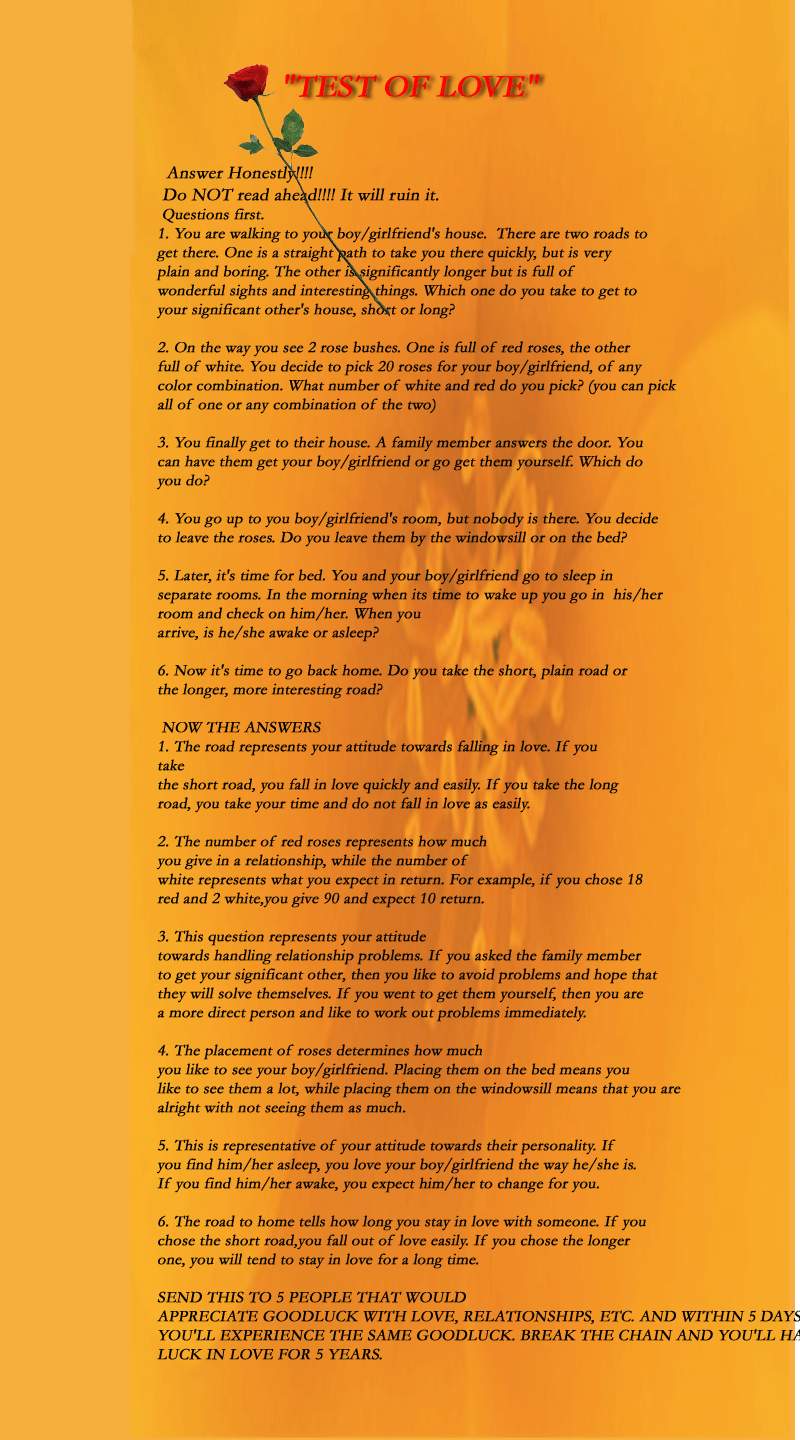
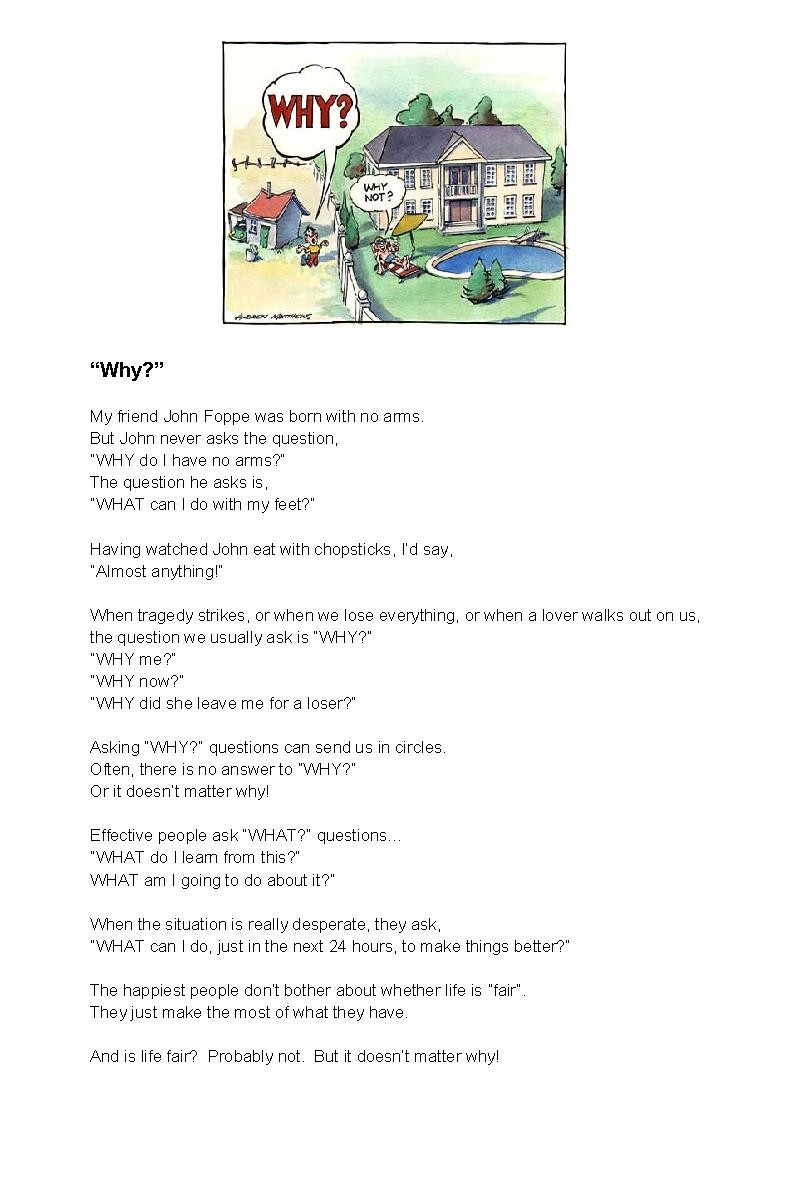 Dear Amanda, In my opinion, it is difficult to associate a vehicle problems with self - Feng Shui. However, under the Five elements concept, we could chose a colour of a car that harmonises with our element. For example, a person with `weak wood' can be advised to purchase a car that is blue or green. (First choice: Blue/grey or black). As FS and Pillars are holistic methods, one may have to look at one's element and strength, the house Feng Shui (where we try to avoid or neutralise `bad luck' such as sectors of the house with `misfortune' #5 stars (if we are basing to FS/ Pillars). Otherwise, it could be real mechanical problems with your car etc... Warmest Regards, CecilDear Debbie, In my opinion, the concern here is more of `commonsense' approach. Many of the advise in Feng Shui dwells with `commonsense'. For example, the advise is that it is not good to have a bedroom above a kitchen. Although, fire can happen anywhere in the home, there is some possibility that a fire could break out of a kitchen. As fire, smoke and heat rises; someone living just above the kitchen could be at risk. In your case, it has more to do with `privacy' and security than "inauspicious" Feng Shui. In my opinion, so long as you can add e.g. an opaque film or secure the windows, this would be acceptable since there is no where else to place your head. This is unlike a beam above one's head and has lesser implications or no implications if it is secure and there is privacy. Warmest Regards, CecilDear Thao, Please see below:- You can make use of the Eight House report under the following URL:- Manual method of obtaining your Eight House Chart (with step-by-step) information on how to do so:- http://www.geomancy.net/fs/house1.htm Free computerised Eight House report is available under:- http://www.geomancy-online.com In my opinion, using sector Feng Shui is not effective to enhance your career. For example, some FS practitioners would advise that North = career sector and have advised their clients to enhance this sector. This method is too general to be of any good to everyone as it is not personalised. In Traditional Feng Shui, what is most important is to understand each person's element and strenght. For example, whether one is a `weak wood' or `strong wood' person. By knowing a person's element and strength, this information is used under a lower common denominator i.e. the five elements concept and can then be applied to enhance self (Pillars of Destiny) and Home audit (Flying Star). When combined, this is a holistic method of the use of traditional FS. Warmest Regards, CecilDear Tammy, 1. Under the FS concept, "if one can no longer see the threat, it no longer becomes a threat." 2. In your situation: 2.1. The most effective method is to protect the bedroom windows e.g. use a curtain or blind. 2.2. The other method is to plant trees behind the house such that it will block the view of the power cables. (But this may not be feasible or it may take time). Warmest Regards, CecilDear Nikhil, If you have seen most of the questions posted, Feng Shui and Destiny deals trying to increase luck. Feng Shui tries to increase one's earth luck while Destiny (Pillars of Destiny) maps out the heaven luck and we can enhance oneself with it. Thus, it is hard at the moment to pinpoint what went `wrong' presently. The other situation is that holistic Feng Shui plus destiny depends on your level of participation or usage of it. For a start, you can:- 1. Improve on `Earth' Luck You can use some of the concepts or check whether your home is `harmonized' with - Shapes and Forms Feng Shui - Eight House - Flying Star 2. Improve on `Heaven' Luck - Pillars of Destiny - knowing one's element and strength Warmest Regards, CecilDear Harini, You can make use of the following:- 1. How to apply the Eight House theory:- http://www.geomancy.net/fs/house1.htm 2. You can also make use of the free computerised report at http://www.geomancy-online.com to generate the report. Under the Eight House, it is nice to have the table facing one of your 4 good directions. Warmest Regards, CecilDear Dirk, When one is using simplified analysis, using only the Year of birth, your Chinese star chart will be based on e.g. Fire-Dragon. Ref: www.lovesigns.net (Year of birth module). The free report would correctly indicate your element. However, the element and strength should be taken into consideration. For example, weak wood or strong wood. A weak wood person should have addition of water element to help wood to grow. A strong wood person differs from a weak wood person in that the strong wood should be neutralised. Here, he can make use of metal element. Where metal destroys wood to create wealth. Ref: http://www.geomancy.net/fs/5element.htm Warmest Regards, CecilDear Anon, One of the basic questions involving the bed room has to do with the level or balance of yin / yang. Here, Yin relates to rest. While Yang relates activity. Therefore, " Yin " is favoured instead of Yang especially in a bedroom. Where rest should be more important. However, especially for the growing i.e. children or students, especially if they are studying, should have a mix of yin and yang in the bedroom especially if this location allows them for work and later for rest. A water fountain depending on its size, may create a MORE Yang condition and with an aquarium. There is no hard and fast rule to say that one should not use such items in the bedroom other than for the following considerations:- 1. If one wants more yin environment in the bedroom, then avoid having a water position. 2. If one uses the Flying Star analysis, does water element create an imbalance? at the sector? If not, it is still May be acceptable to have such a water feature in the room. A good point to note is that for some of us, we may feel uncomfortable with a mirror facing us; while others may not feel anything to the person. The degree of tolerance differs for each person. Warmest Regards, CecilDear Kevin, As the house is `shared' not much you can do here. However, since you mentioned that you are a weak wood person, you can enhance yourself with the following:- 1.Look under the Luck Pillars to see whether the season has any influence on your element i.e. weak wood. For example, if the current 10 year season is " Metal " element, this may not ba an auspicious period. And the cure is to enhance yourself with Water element or Wood element. For example, if the current 10 year season is " Water " element, this is considered favourable to you. For a weak wood person, you should try to enhance yourself with (first: Water) or (secondary: Wood element). For example, you should wear more of clothes i.e. blue, grey or pants grey and black (Water element). Or brown or green (wood element). For your bedsheet, for example, you can use blue, grey to help your weak wood grow. As for the Eight House, this is not as crucial as the above, as the house is not all yours. Warmest Regards, CecilBelieve or not. (Source unknown) - for fun.... (A) Is your birthday day 1 of the month? Your Life You are very curious and dedicative. When you are interested in something, everything else has to wait. This is your quality. But if you learn to be more patient and complete what you have started, you will be successful in life. Your Love You believe in love at first sight. You won't wait to learn more about the person. Vise versa, people who fail to impress you will hardly get a chance to be your friend. Your emotion is on the extreme. You can only love or hate, nothing in between and this often shows in your statement. Try not to end a relationship in a quarrel. (B) Is your birthday day 2 of the month? Your Life You have great common sense but usually fail to follow through. This might happens because you are too busy with your mission and shut yourself from the outside world. You are clever and profound so there's a slight chance for self-control problem. Your Love Your love progress slowly, and quietly. You seem to be contented with your unrequited love. Your are a romantic and loyal lover. (C) Is your birthday day 3 of the month? Your Life Although you are innocent and romantic but your statement often mislead others that you are an active, fun loving kid. Because of your double personality, it's hard for others to really know the real you. You are careful and patient. Your Love Your love is the greatest which often surprises others. No one can bring you to light when you are in love. Your confidence might lead you to the track your parents disagree. (D) Is your birthday day 4 of the month? Your Life You usually think before acting which makes your life quite easy. But you often are the one who give yourself a hard time by being paranoid. People might not truly understand you but you are really nice to be around. You are cheerful and friendly. Your Love Still water runs deep, that's what you are. You always surprise others with your new character when you are in love. Your love trap often comes unexpectedly and your love life is full of surprises. (E) Is your birthday day 5 of the month? Your Life Although you are on the quiet side, but you enjoy excitement and changes. Routine is something you cannot stand. Because of your extreme confidence, you hardly ask others for opinion. You believe in leading your own life, and you have got the gift in doing so. Your Love Nothing can stop you from making progress in your love life. Once you are in love, you feel the ownership of your lover. A third party can only makes your jealousy becomes worse. (F) Is your birthday day 6 of the month? Your Life You are generous with people in need, sometimes to an extreme that people find you nosey. Your hidden courage and dedication often surprise others. Your imagination is extremely unique. Your Love Your love life is on the smooth track because it grows from friendship. Although you may not make a sweet lover but your sincerity bring happiness to your couple. (G) Is your birthday day 7 of the month? Your Life You are sensitive to changes around you but your feeling is hardly expressed. You hate exaggerations. Under your quiet personality, you are rather stubborn and self-centered. These qualities are the force behind your extreme persistence. Your Love You have enormous courage to please your lover. Your relationship often progress quickly. (H) Is your birthday day 8 of the month? Your Life You have pleasant and friendly personality. People look up to your wit and imagination. You are unpredictable and hardly complete what you started, which sometimes create negative impact to people around you. Your Love Falling in love becomes your routine. Most of the time, you are lucky. You fascinate people with good taste but you never have enough with one. Although your love progresses very fast, it never lasts. (I) Is your birthday day 9 of the month? Your Life You often have problem in promoting yourself, just because you don't know how to express your true self. On the other hand, you don't really care what they think. This is why people misunderstand you until they really get a chance to learn about your pleasant personality. Opposite sex find you mysterious and worth searching. Your wit is remarkable but sometimes you are too fast to follow. Your Love You won't reveal your feeling even after dreaming about the same guy over and over. Your first love lasts forever. You are responsible to the feelings of your lover. The chance to betray your lover is none. You have luck with children. (J) Is your birthday day 10 of the month? Your Life You are very capable. If you are a woman, you have high chance to be a renowned workingwoman. If you are a man, your path to fame and honor is near. As an innovator, you are not a good follower. You are good in implementing your imagination and share it with others. You are always well dressed. Your Love You often lose your love ones from being too jealous. You always feel like you own the person you fall in love with and that often blows your relationship. (K) Is your birthday day 11 of the month? Your Life You are gracious, elegant and prudent. People admire your qualities and some even become jealous of you. You are realistic, flexible and adaptable. You are remarkably kind and moral person. Your Love You are willing to sacrifice yourself for the one you love. Your lover will always have your gentleness, care and loyalty. You will always be happy to hand around the one you love. (L) Is your birthday day 12 of the month? Your Life You are friendly, humorous and full of energy. You are open-minded and do not care for minor details. Your weak point is your hot temper. Your Love You are willing to start off in one-sided love affairs because you strongly believe that you will eventually win his/her heart. On the other hand, once you are together, you always want to do things your way, which is often the fire starter. You usually run in and out of love quickly. (M) Is your birthday day 13 of the month? Your Life You are sincere and easy going. Flattering and charming around are not your style. You care so much for freedom that often leads you to the difficult path. Because of your sincerity, most people find you easy to be around although you are sometimes too straightforward. Your Love Your gentleness, care and sincerity make you an attractive person. Even though you don't intend to be charming, but you naturally are, especially in the eyes of opposite sex. (N) Is your birthday day 14 of the month? Your Life You are so confident that sometimes you forget about the people around you. If you have to be in one of the two teams, you will choose to be in the winning team. On the other hand, you are kind and caring but above all, you care for your own benefits. Your imagination is unique and often gets implemented shortly after it comes across. Your Love You will not get soft with the one you don't really like, no matter how hard he/she tries. But once you feel for someone you have chosen, there's no getting back. (O) Is your birthday day 15 of the month? Your Life You are outgoing and love to be at the center of attention. From the outside, you may seem flashy, flirty, and tricky but your true self is strong, full of hope to be the leader. When you fail to convince someone, you will get frustrated, and perhaps let your temper shows. Your Love You are emotional. Many can win your heart at once, but not for long. This is why you hardly win a decent relationship. (P) Is your birthday day 16 of the month? Your Life You always follow the good and the right instead of listening to your heart. Another word, you are a perfectionist. You care for every word people say about you. You often seen isolated while you are, by nature, curious and a dreamer who is ready to get over the edge to make your dream comes true. Your Love You often fall in love with a person who is much different from you, in age and other aspects. Your relationship grows on friendship. Love at first sight is not your style. (Q) Is your birthday day 17 of the month? Your Life You neither want to be interfered nor have the desire to mess with others' life. But you are friendly and occasionally a party animal. You are always in a circle of friends. You often do things in your own way that occasionally go beyond the acceptable limit. People may find you childish and not very attractive in that sense. Your Love Your fun-loving character attracts opposite sex. Many of those are great. You often find yourself trapped among a few great guys/girls while you have to choose only one. (R) Is your birthday day 18 of the month? Your Life At first glance, people think you are quiet type of person. Actually you are cheerful, but conditionally. You will show your joyful character only in good mood. One the other hand, when you are moody, no one would dare to be around. Because of your emotion fluctuation and frank character, some find you hard to be around. Your Love You hardly show your feeling towards opposite sex no matter how much you like him/her. Your partner also has similar character so your love affairs often take quite a while to flourish. Time tells it all. Your sincerity makes you very attractive. (S) Is your birthday day 19 of the month? Your Life You are great in managing everything in your life and this is how you gain respect from others. Because of this quality, you sometimes feel that you are better than the rest. Extreme confidence might lead you to the wrong path. You are a free bird and want to lead your own life. Your Love You love life is rather different from others'. When you are in love, nothing can stop you. You may often fight with your partner but, soon after that, you will make up in a way that surprises others. (T) Is your birthday day 20 of the month? Your Life You are prudent, circumspect and take things seriously. Before you make any move, you will think of a few alternatives that might take a while. You are patient, imaginative and target oriented. You value friendship more than anything else. Your Love You usually study your partner carefully before making any move. You never demand anything beyond the natural quality of that person. Your sincerity doesn't bring excitement in your love life but it brings deeply grown relationship. (U) Is your birthday day 21 of the month? Your Life You are curious and a true follower. You can please someone so much that it seem like you are trying to charm that person. You hide your disagreement under your smiling face. This is a charming quality of yours. Your Love You are quite unlucky in love. You are loved by someone you don't like while your dream man/woman is so far away. Your love life is occasionally under turbulence. Sometimes you don't have the clear view of the guy/girl in your heart. (V) Is your birthday day 22 of the month? Your Life You have the boss character, but not a leader. Most people look up to you for your capability and confidence although they find you quite stubborn. You should listen more to others. You are a unique and charming individual. Your Love You hardly take the moderate track. You either love or hate someone. Whom you call friends are the chosen ones. If any of them betray you, you won't let them get away without having hard time. (W) Is your birthday day 23 of the month? Your Life You never live your life in the way others want you to. You are an independent individual who loves challenges and excitement. You are ready to face with the result of your decision. You are usually the one your friends count on. Your Love Because you love excitements, you occasionally get involved in forbidden love affairs. You may fall in love with a married person and no one can stop you from making progress. You are very charming, although you might not realize it. (X) Is your birthday day 24 of the month? Your Life You are very optimistic and that's why you always enjoy life. You are gifted in entertaining others. Your friends love and trust you. You'll be the first they come to when they are in need of someone to speak their heart out. Your Love Sometimes you fall in love just because you want to be in love, not that you really like that person. You always be seen as a sweet couple but you can't really get over your love ones from past. Your partner is usually crazy about you because you are remarkably charming and romantic. (Y) Is your birthday day 25 of the month? Your Life You are a warrior. No obstacle can stop you from reaching your goal. You always keep yourself busy. This quality plus your responsibility will eventually bring you success. Your Love You adore your partner as the number one priority. You value your love one more than yourself. Your love is the greatest of all and your have potential to get married young. (Z) Is your birthday day 26 of the month? Your Life You are always curious and responsive to changes. Routine life is not the way you choose to live. Travelling is your favorite hobby because excitement is what you are after. Your Love You will not stand being around the one you dislike. Your love comes and goes quickly. You can be deeply in love but soon after you will be looking around for the next one. (Z1) Is your birthday day 27 of the month? Your Life You are sensitive and vulnerable. Tears often run down your cheeks even when the matter is not that bad. This might be the result from being to pessimistic. You might seem cold on the shell, but your inner self is a kind loving person. Your Love You will be elegantly dressed, no matter how casually dressed your date may be. You are demanding in love and sometimes to an unacceptable extend. (Z2) Is your birthday day 28 of the month? Your Life You are a capable person but you usually underestimate your own ability. This is the cause of missing numbers of opportunity to step forward. If you try to give yourself a chance, you can be successful in life. Try to see things on the bright side and you will be happier than ever. Your Love You are quite unlucky in love. The one in your arm is not the one in your heart. Your love has so many ups and downs. You often chicken out before seeing any progress in love. (23) Is your birthday day 29 of the month? Your Life You can trust your sixth sense. Life is exciting so routine job is not your interest. You have great ideas and fantastic imagination. You often feel tired of things and people around you. Your Love You can tell what's in the mind of another person just from looking into his/her eyes. You are paranoid and jealous and these are the cause of fights between you and your lover. Sometimes the thing you believe in is just your imagination. (Z4) Is your birthday day 30 of the month? Your Life You are always surrounded by a circle of friends. You are friendly and fun to be with. Although you occasionally disappoint them by being stubborn, but over all, they love your qualities. Your Love You want to have full control of your love and that's not a nice way to treat your partner. You take your time in saying yes to his wedding proposal or if you are a man, you will not propose anyone until you are certainly confident which might take ages. (Z5) Is your birthday day 31 of the month? Your Life Your emotion is hard to predict. You can be sad this minute and happy in the next. People might find it difficult to follow your emotion and understand you. You tend to take things seriously. Your Love You take your time to study a person before falling in love. Once you decide that he or she is the one, no one can stop you from making progress, even your partner.Dear Angela, Please see below:- Since it is a light lamp, you can try to buy those golden or silver `stars' or cut out star shaped paper of 1.5 cm each x 6 pieces will do. I also You may have to relook the picture of the river. In my opinion, I feel that, you should not place the picture. (Just my personal feeling only). Warmest Regards, CecilConfidence and Self-Esteem were best friends. They went everywhere together. If Confidence bought a new dress, Self-Esteem bought one just like it. They were very close. One day a new kid came to their school. His name was Peer Pressure. He had a friend called Hateful Words. They decided to give Confidence a hard time. They constantly teased her. They forced her to do terrible things. It was so terrible that Confidence lost Self-Esteem. When Self-Esteem wanted to start dance class, Confidence said they wouldn't be any good. Then one day, Peer Pressure introduced Confidence to Doubt. He wanted to ruin Confidence, but Peer Pressure said he couldn't yet. Self Esteem couldn't understand what was wrong with Confidence. Confidence now hung around with Depression, Low Self-Esteem, and Overeating. These girls were friends of Peer Pressure. Self-Esteem no longer had any friends. She no longer felt good about herself. She went to see her pastor. Pastor Good Words told her how to talk to Confidence. He introduced her to his daughter, Encouragement. Encouragement and Self-Esteem went to find Confidence. Self Esteem hoped she wasn't too late. The girls found Confidence in a stupor. She was no longer a vibrant, happy young girl. There were dark circles under her eyes. She had gained so much weight from eating that she couldn't move. Encouragement gasped and Self-Esteem cried. She begged Encouragement to do something. Encouragement began to hug Confidence. She kissed her and loved her. She told her that she was a beautiful young lady who had a lot going for her. Encouragement held Confidence so tightly that Self-Esteem thought she would smother her. Confidence began to cry. As she cried, she seemed to lose weight. Then a bright light suddenly glowed from Confidence and she began to smile. Peer Pressure and his friends didn't like what Encouragement was doing and tried to attack her. They hit at her and pulled at her, but they couldn't pull her away from Confidence. Then Confidence began to speak. "Get away from me, Peer Pressure. Take your friends and go. You no longer have any power over me." Confidence was now a glowing light. She and her friends made sure that Peer Pressure and his gang never bothered anyone in their town again. If you feel that Encouragement is not your friend, then try to find Encouragement in yourself. Self-Esteem and Confidence will follow.I believe not all women would agree with this but this is really interesting.... Women's words and what they mean: 1. Fine: This is the word we use at the end of any argument that we feel we are right about but need to shut you up. NEVER use fine to describe how woman looks. This will cause you to have one of those arguments. 2. Five minutes: This is half an hour. It is equivalent to the five minutes that your football game is going to last before you take out the trash, so I feel that it's an even trade. 3. Nothing: This means something and you should be on your toes. "Nothing" is usually used to describe the feeling a woman has of wanting to turn you inside out, upside down, and backwards. "Nothing" usually signifies an argument that will last "Five Minutes" and end with the word "Fine." 4. Go Ahead (with raised eyebrows): This is a dare. One that will result in a woman getting upset over "Nothing" and will end with the word "Fine." 5. Go Ahead (normal eyebrows): This means "I give up" or "do what you want because I don't care." You will get a raised eyebrow "Go Ahead" in just a few minutes, followed by "Nothing" and "Fine" and she will talk to you in about "Five Minutes" when she cools off. 6. Loud Sigh: This is not actually a word, but is still often a verbal statement very misunderstood by men. A "Loud Sigh" means she thinks you are an idiot at that moment and wonders why she is wasting her time standing here and arguing with you over "Nothing." 7. Soft Sigh: Again, not a word, but a verbal statement. "Soft Sighs" are one of the few things that some men actually understand. She is content. Your best bet is to not move or breathe and she will stay content. 8. Oh: This word followed by any statement is trouble. Example; "Oh, let me get that". Or, "Oh, I talked to him about what you were doing last night." If she says "Oh" before a statement, run, do not walk, to the nearest exit. She will tell you that she is "Fine" when she is done tossing your clothes out the window, but do not expect her to talk to you for at least 2 days. "Oh" as the lead to a sentence usually signifies that you are caught in a lie. Do not try to lie more to get out of it, or you will get raised eyebrows "Go ahead" followed by acts so unspeakable that I can't bring myself to write about them. 9. That's Okay: This is one of the most dangerous statements that a woman can say to a man. "That's Okay" means that she wants to think long and hard before paying you retributions for what ever it is that you have done. "That's Okay" is often used with the word "Fine" >and used in conjunction with a raised eyebrow "Go Ahead." At some point in the near future when she has plotted and planned, you are going to be in some mighty big trouble. 10. Please Do: This is not a statement, it is an offer. A woman is giving you the chance to come up with whatever excuse or reason you have for doing whatever it is that you have done. You have a fair chance to tell the truth, so be careful and you shouldn't get a "That's Okay." 11. Thanks: A woman is thanking you. Do not faint, just say you're welcome. 12. Thanks A Lot: This is much different from "Thanks." A woman will say, "Thanks A Lot" when she is really ticked off at you. It signifies that you have hurt her in some callous way, and will be followed by the "Loud Sigh." Be careful not to ask what is wrong after the "Loud Sigh," as she will only tell you "Nothing."Source and credit: This came from a Rig Manager for Global Marine Drilling in St. Johns, Newfoundland. They actually have to divert the path of these things away from the rig by towing them with ships! Anyway, in this particular case the water was calm & the sun was almost directly overhead so that the diver was able to get into the water and click this pic. They estimated the weight at 300,000,000 tons. (See attached file: Iceberg 2.jpg)
 Note: Below is not `real' but rather, a *Joke* about the use of yellow talisman to ward-off virus attack to one's PC:- For those of you prone to computer crash / virus attack /whatever computer problems, you are advised to: 1. print out then burn the attached ang kong hu (ang kong talisman), and drink the water from the ash 2. recite always the following mantra " popi computer bei hang, bei tiuk virus, always peng an ". Under Para 2, this is based on Hokkien sentence which is interpretted as: "Pray hard that my computer does not hang or get virus and always peaceful."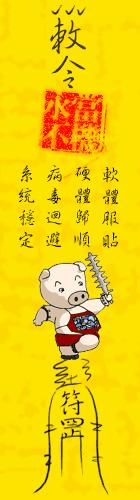

Account
Navigation
Search
Configure browser push notifications
Chrome (Android)
- Tap the lock icon next to the address bar.
- Tap Permissions → Notifications.
- Adjust your preference.
Chrome (Desktop)
- Click the padlock icon in the address bar.
- Select Site settings.
- Find Notifications and adjust your preference.
Safari (iOS 16.4+)
- Ensure the site is installed via Add to Home Screen.
- Open Settings App → Notifications.
- Find your app name and adjust your preference.
Safari (macOS)
- Go to Safari → Preferences.
- Click the Websites tab.
- Select Notifications in the sidebar.
- Find this website and adjust your preference.
Edge (Android)
- Tap the lock icon next to the address bar.
- Tap Permissions.
- Find Notifications and adjust your preference.
Edge (Desktop)
- Click the padlock icon in the address bar.
- Click Permissions for this site.
- Find Notifications and adjust your preference.
Firefox (Android)
- Go to Settings → Site permissions.
- Tap Notifications.
- Find this site in the list and adjust your preference.
Firefox (Desktop)
- Open Firefox Settings.
- Search for Notifications.
- Find this site in the list and adjust your preference.